Written and engineered by WPAgency Studio
A season you notice, a system you don't
How four of our websites came to mark the seasons in autumn 2026: what each one shows, how the page decides which day it is, what we ran into on the way, and what we would do differently.
This autumn, four of our websites started to notice the time of year. WPAgency.xyz, the agency’s own site, has a small drawing at the end of its footer and a lighter one at the top of most pages. Roseville Landscape Material Supply, a client of the agency, has autumn leaves in the corners of its homepage. This site has a constellation over its footer. And Roseville Star Ready Mix, which delivers concrete to job sites around Roseville, has leaves on its homepage and a sprig in its footer.
None of them asks you to do anything, and none of them moves anything you came for. That was the brief, and it is the idea this entry keeps returning to: good seasonal design is something visitors notice without having to think about how it works.
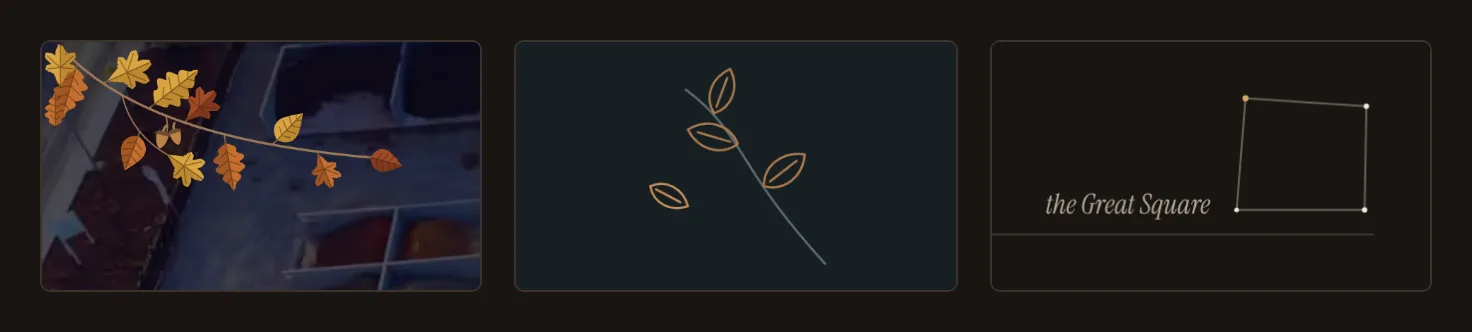
Autumn on three sites, captured from production on 3 November 2026. From left: Roseville Landscape Material Supply’s homepage, the end of WPAgency.xyz’s footer, and the footer of this site.
Atmosphere, not decoration
A site that looks the same all year reads as something built once and left. A small change with the season says the opposite: someone is still here, and still paying attention. That was the whole of the reason.
The risk is obvious, because so much seasonal design on the web is decoration: snow falling across the text, a banner over the menu, a pumpkin that bounces until you leave. Decoration asks for attention. Atmosphere sits at the edge of the page and gives way to whatever you came to do. So before anything was drawn, the sites shared a short set of rules:
- Decorative only. Never text, never a link, and hidden from screen readers, which have nothing to gain from it.
- Nothing over a word, a button, a form or a control, and no space taken, so nothing on the page moves when a drawing appears.
- Motion once at most, as the page opens, and none for a reader who has asked their device for less.
- One switch in the footer that turns everything off, remembered on that device.
- Nothing extra to download first, no new service, and nothing to agree to.
WPAgency.xyz added rules of its own: no snow, confetti, fireworks or animated pumpkins, no pair of symbols with a religious reading, and no festive or moving treatment on a day of remembrance.
How the page decides which day it is
The hard part of a seasonal website is not the drawing. It is deciding, for every visitor, which day it is, and getting that right on a page that may have been built weeks ago, kept by a browser, or saved for offline reading.
WPAgency.xyz, Roseville Landscape Material Supply and this site make that
decision in the same place: at the top of the page, before anything is drawn. A few lines of script read today’s date in one fixed
time zone (never the visitor’s own zone, place or language) and mark the page
with the season, as an attribute such as data-season="autumn". Every drawing
is already in the page, hidden; the stylesheet shows the one the attribute
names. Without JavaScript nothing is shown, and the site looks as it always
does.
That one decision settles most of the hard questions at once. Nothing flashes, because the page is marked before its first paint. A season starts at midnight without anyone deploying anything. And a page that is weeks old cannot show a holiday that has ended, because the page checks the date for itself.
What differs is what each page carries for the script to choose from:
- WPAgency.xyz: four seasons, from 1 March, 1 June, 1 September and 1 December, and seven US holidays, in New York time. They appear at the end of the footer, at the top of most pages and as a hairline above the footer, and on the homepage as low light in the opening section for autumn, winter and Halloween.
- Roseville Landscape Material Supply: autumn from 22 September, winter from 1 December and spring from 20 March to 31 May, in Los Angeles time. They appear in the corners of the homepage’s opening section (just below it on a phone) and in the footer.
- WPAgency Studio: four seasons, by month, in New York time, over the footer’s horizon line.
WPAgency.xyz: restrained, and on a schedule
The agency’s site has eleven treatments: the four seasons and seven holidays (New Year, Valentine’s Day, St Patrick’s Day, Independence Day, Halloween, Thanksgiving and Christmas). A holiday takes precedence over its season and hands back to it when it ends. Each treatment is the same three small things: a line drawing at the end of the footer’s “Built to last.”, a lighter companion at the top of most pages, and a hairline in its colour where the page meets the footer. Autumn is a twig with three leaves and one let go, in muted amber. Christmas is a pine bough with one brass bauble, whose glint twinkles once.



The right-hand end of WPAgency.xyz’s footer, captured from production on 3 November 2026. Left: autumn’s twig. Centre: the same footer after “Seasonal decorations” is switched off. Right, a preview: the same live page with the browser’s clock set to 22 December 2026, when it shows Christmas from the treatments it already carries.
The calendar is checked whenever the site is built. An unknown treatment, an impossible date, a commemorative day given a festive or moving treatment, or two holidays that would overlap in any year from last year to 75 years ahead stops the build before anything is published.
The agency’s site is built ahead of time, so in its first version a season changed when the site was rebuilt. An hourly job on GitHub compares the live homepage with the calendar and, only when the two differ, asks Netlify for a fresh build: 17 or 18 builds a year. That worked, and then we learned how little an hourly schedule promises (more on that below). So each scheduled build now also works out the changes due in the next 60 days and carries them in the page, hidden, and the script at the top of the page applies the latest one whose moment has passed. A season or holiday now starts at midnight in New York for every visitor, including on a page kept or saved before the change. The rebuild only refreshes what the pages carry. Measured on 1 November, the busiest stretch of the year with four changes ahead, that costs about 2 KB per page compressed, with no extra request and no extra script file. If the site ever went 60 days without a build, the decorations would stop rather than go stale.
Roseville Landscape Material Supply: a supplier’s seasons
The client sells rock, bark, mulch, sand and soil from a yard in Roseville, California, and its site has a different temperament. The drawings are botanical and more generous: in autumn, oak and maple leaves and acorns in the golds, copper and russet of the brand’s own ambers; in winter, pine needles, frost and cones; in spring, blossoms. The calendar is autumn, winter from 1 December and spring from 20 March, all automatic, and seasons only. A Thanksgiving treatment (wheat, small gourds, leaves and acorns) is drawn but not switched on.
On a wide screen a branch reaches in from the top-left corner of the homepage’s opening photograph, a few leaves drift down once and settle, and more rest in the bottom-right corner, clear of the headline and the buttons. On a phone that opening is all headline and buttons, so the branch is left out and the leaves fall just below it instead.


Roseville Landscape Material Supply, captured from production on 3 November 2026: a desktop screen 1,440 pixels wide, and a phone 390 pixels wide.
This site needs no scheduler, build hook or rebuild at all. Each page carries the drawings of every season that is switched on, and the script picks today’s in Los Angeles time, where the yard is. The drawings are small SVG files that the browser fetches only when one is shown, then keeps. The switch is in the footer in both of the site’s languages: “Seasonal decorations” and “Decoraciones de temporada”.
WPAgency Studio: the sky, not a decoration
This site’s art direction refuses illustration drawn for its own sake, and its footer is already a night. Leaves would have been the wrong answer. Instead, the footer shows the figure each season’s evening sky is known by, plotted from the stars’ catalogue positions as someone facing south would see them: Orion in winter, Leo in spring, the Summer Triangle in summer and the Great Square of Pegasus in autumn. Each star is sized by its brightness. The figure sits just above the footer’s horizon line, takes no space and does not move.


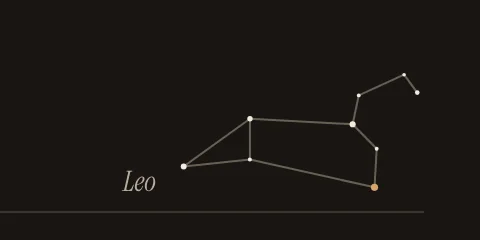

This site’s footer sky. Autumn’s Great Square is from production on 3 November 2026. Orion, Leo and the Summer Triangle are previews: the same live page with the browser’s clock set to 15 January, 15 April and 15 July 2027.
The seasons here are meteorological (spring from 1 March, summer 1 June, autumn 1 September, winter 1 December), read in New York time. All four skies come to about 3 KB of drawing per page, under 1 KB compressed, with no image to request. The script that picks one is the same text whatever the setting, so turning the sky off for the whole site never means updating the site’s strict policy on scripts. The reader’s switch says “Seasonal sky”, and it stores something only when it is turned off; a reader who never touches it has nothing saved. There are no holidays here.
Roseville Star Ready Mix: light on red and navy
Roseville Star Ready Mix’s homepage opens on a deep red, and its footer is navy. Its drawings are in light tones that read on both: in autumn, gold and amber oak and maple leaves with acorns.
On a screen 1,024 pixels wide or more, a branch reaches in from the top-right corner of the homepage’s opening, a few leaves drift down once and settle, and more rest in the bottom-right corner, clear of the text and the buttons. On a narrower screen only the resting leaves remain, at the foot of the opening. A sprig sits at the top right of the footer on every page, and the switch in the footer reads “Seasonal decorations”.
The seasons follow the date in Los Angeles. Autumn is what shows now, to 30 November. Winter, an evergreen bough with pine cones and frost that does not move, is scheduled from 1 December, and spring, a branch in blossom, from 20 March to 31 May. No holiday is enabled.
How it was checked
Each site has tests that set the clock to the turns of its calendar, including a daylight-saving change and the turn of the year. On every site the reader’s switch can only hide a season; it can never show one that is not due.
The agency site had the most to check. Before it went live, an automated pass opened five pages with each of the eleven treatments, in both colour themes and at three screen widths: 330 page loads, each checked for overlap with text, links, buttons and forms, for layout shift, for accessibility and for motion under a reduced-motion setting. Every preview build also has a review page that shows the real homepage with any treatment beside the original, on a desktop, a tablet or a phone. A simulated season of hourly runs, from 31 October to 31 March across both clock changes, confirms that the scheduler rebuilds once for each of the thirteen changes in that stretch, at the first run after midnight, and at no other time.
What we ran into, and what changed
The schedule needed the right owner. GitHub runs a scheduled job as the account that last changed its schedule, and only if that account can write to the repository. We found this when the hourly job did not start on its first day, and it mattered because that job is what refreshes the pages. Recommitting the schedule from the owner’s account started it, and the site’s own documentation now records the rule for whoever changes the schedule next.
Hourly is a request, not a promise. GitHub runs scheduled jobs on a best-effort basis: on 31 October, 3 of the 24 hourly slots ran. For a site whose seasons should turn at midnight, a job that might run at half past five in the morning or half past seven in the evening is not a clock. That observation produced the 60-day look-ahead described above. The page now decides the moment itself, and the scheduler only keeps the pages fresh.
The day after Halloween. Preview builds carry all eleven treatments, so that each can be reviewed. When Halloween ended at midnight in New York on 1 November, a verification rule written for live builds started flagging those previews, because it expected a holiday on the page wherever holiday drawings were present. Live builds were never affected. The rule now tells the two kinds of build apart, a test covers both, and we kept a habit from it: test the ordinary days as carefully as the festive ones.
A component carries its assumptions. When we brought the affected site’s
implementation to another site the next day, the drawings stayed hidden in
testing. They started out hidden with the HTML hidden attribute, and that
site’s CSS framework, a newer major version than the original’s, hides the
attribute with a rule marked important, which the decorations’ own stylesheet
could not override. The drawings now start hidden by the stylesheet instead,
and a test makes sure the attribute does not return. That site also allows scripts only
from its own files, so the date script became a small file of its own, loaded
at the end of the page, where it never competes with the stylesheet and fonts.
What we would do differently
Start in the browser. The simplest of the designs, a date read in the page before it is drawn, turned out to be the most robust. The agency site reached it in two steps, by way of a scheduler.
Write one calendar. Each of the four sites has its own version of the same date logic. If we started again, the calendar would be shared, and only the drawings and where they sit would belong to each site. That is an intention, not something built.
Test the ordinary days. Most of what surprised us happened on a day when nothing was supposed to.
What is live, and what is not yet
As of 3 November:
- Live: autumn, on all four sites.
- Scheduled, and not yet seen live: Thanksgiving on WPAgency.xyz from 26 to 29 November; winter on all four sites from 1 December, with Orion over this footer; Christmas on WPAgency.xyz from 20 to 26 December and New Year from 31 December; spring from 20 March on Roseville Landscape Material Supply’s and Roseville Star Ready Mix’s sites.
- Not enabled: Roseville Landscape Material Supply’s Thanksgiving, which is drawn but not switched on. Holidays on this site are not planned.
If you noticed the twig, the leaves or the Great Square before reading this, that was the point. If you did not, that was the point too.
Where to go next
- See it live: the footer of WPAgency.xyz, the homepages of Roseville Landscape Material Supply and Roseville Star Ready Mix, and the bottom of this page.
- The case studies: Roseville Landscape Material Supply and Roseville Star Ready Mix, on WPAgency.xyz.
- More on Roseville Landscape Material Supply: When the Whole Grid Turns Green, on measuring its local search.
- How this site is designed: Design.